
Registry overview
Every project gets a private slice of registry.deploys.app for its own application images. Push from CI, pull from your deployments — no extra credentials to plumb around.
The Registry page#
The Registry tab lists every repository in the project. Each repository
groups its tags (named pointers like v1.8.0) and its manifests (the
underlying immutable digests).
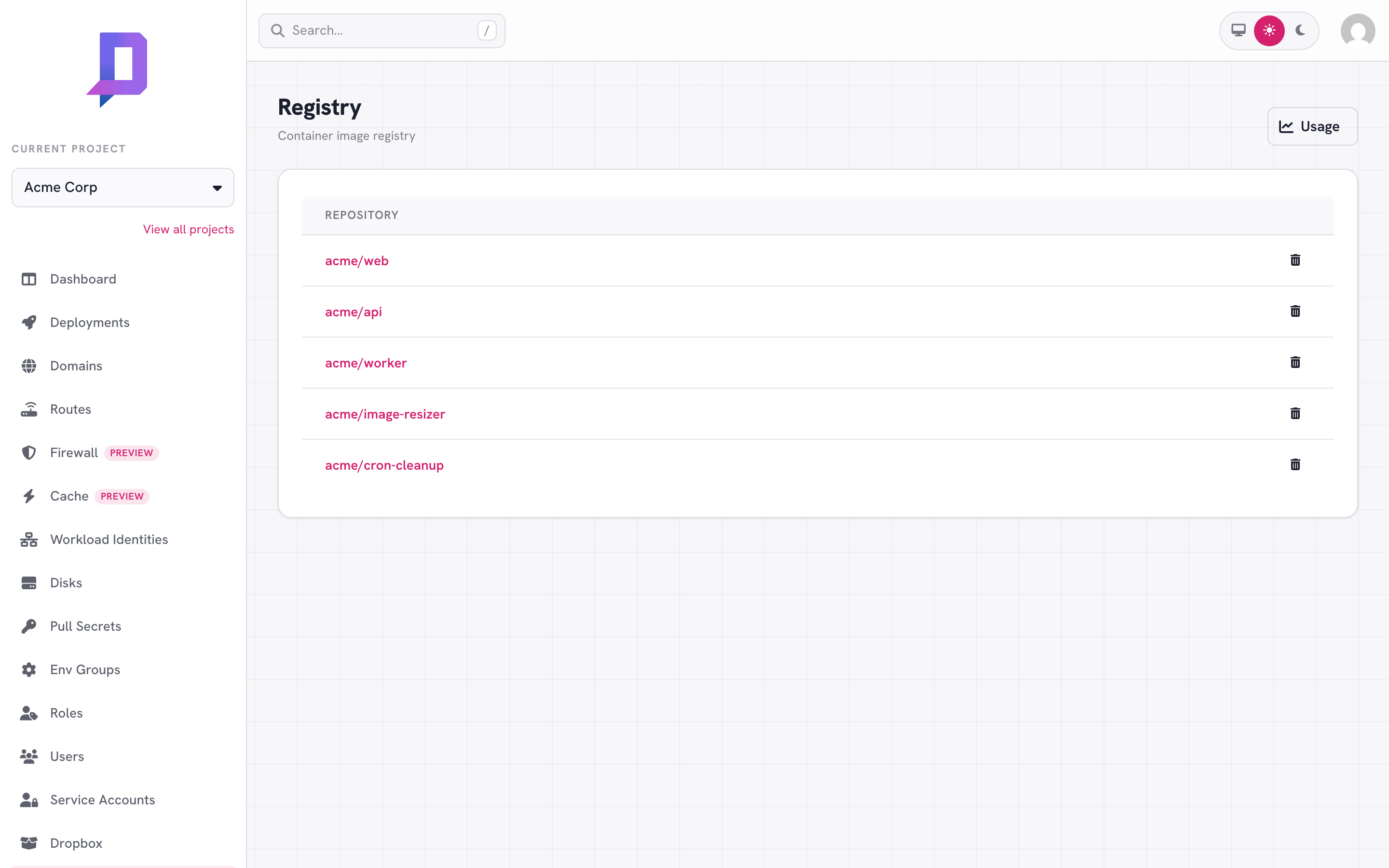
Click into a repository to see its tags and manifests, and to delete tags or the repository itself.
Authentication#
Login with the same credentials you’d use against the API: either a personal OAuth token, or a service-account email and key.
# personal token (short-lived)
docker login registry.deploys.app -u "<your-email>" -p "$DEPLOYS_TOKEN"

# service account (long-lived; the same credentials you use in CI)
docker login registry.deploys.app \
  -u "$DEPLOYS_AUTH_USER" -p "$DEPLOYS_AUTH_PASS"
The username for service accounts is the account email; the password is the key. Generate one from Service accounts → Keys in the console.
Using a Google Cloud service account#
You can also authenticate with a Google Cloud service account instead of a
deploys.app key — handy when you already run in Google Cloud or in GitHub Actions
with a Google credential. The username is the literal oauth2accesstoken and the
password is a short-lived access token for the service account:
docker login registry.deploys.app \
  -u oauth2accesstoken \
  -p "$(gcloud auth print-access-token \
        --scopes=https://www.googleapis.com/auth/userinfo.email)"
Two things are required:
- The access token must carry the
https://www.googleapis.com/auth/userinfo.emailscope. The registry identifies the caller by the token’s email, so a token without that scope (for example the defaultcloud-platform-only token) is rejected withunauthorized: authentication required. - The service account’s email must be granted registry access on the project.
Add
<name>@<project>.iam.gserviceaccount.comas a member of a role that holdsregistry.push(to push) and/orregistry.pull(to pull) under Roles, exactly as you would any other member.
In GitHub Actions with google-github-actions/auth, request the email scope
alongside any others you need, then log in with the access token:
- uses: google-github-actions/auth@v3
  id: auth
  with:
    credentials_json: ${{ secrets.GOOGLE_CREDENTIALS }}
    token_format: access_token
    # keep cloud-platform too if the same token also pushes to Artifact Registry
    access_token_scopes: https://www.googleapis.com/auth/userinfo.email
- uses: docker/login-action@v4
  with:
    registry: registry.deploys.app
    username: oauth2accesstoken
    password: ${{ steps.auth.outputs.access_token }}
Pushing an image#
The repository name is <project>/<name> — the project is your project ID,
the name is whatever you want (matches your deployment names for clarity).
docker tag acme-web:local registry.deploys.app/acme/web:v2.4.1
docker push  registry.deploys.app/acme/web:v2.4.1
The first push to a previously-unseen <project>/<name> creates the
repository implicitly. There’s no separate “create repository” step.
Pulling from a deployment#
Deployments in the same project pull from registry.deploys.app automatically
— the platform injects the right credentials at deploy time. You set
image: registry.deploys.app/<project>/<name>:<tag> in the deploy config and
that’s it.
{
  "name": "api",
  "image": "registry.deploys.app/acme/api:v1.8.0"
}
For images in a different project’s namespace, or in a third-party registry, you need a pull secret.
Tags and manifests#
The console shows two tabs inside a repository:
- Tags — named pointers like
latest,v1.8.0,staging. You can delete a tag without deleting the underlying manifest. - Manifests — the immutable image digests. Each push creates a new manifest (unless the layer set is unchanged); each tag points at one of them.
curl https://api.deploys.app/registry.getTags \
  -H "Authorization: Bearer $DEPLOYS_TOKEN" \
  -d '{ "project": "acme", "repository": "acme/web" }'

curl https://api.deploys.app/registry.getManifests \
  -d '{ "project": "acme", "repository": "acme/web" }'
@sha256:…) instead of by tag whenever you can —
deployments become reproducible and rollbacks always find the right image.
The CI GitHub Action makes this easy via the
docker_build step’s outputs.digest.Storage and quotas#
Storage is metered and billed — see the Usage button in the top-right of the Registry page for the current size of each repository over time. Trim unused tags and manifests to keep the bill in check.
The same numbers are available from the API. registry.get returns one
repository’s current size; registry.getProjectStorage returns the whole
project’s registry footprint; and registry.metrics returns storage and egress
as time-series over a timeRange (7d, 30d, or 90d) — the series behind the
Usage charts.
# one repository's size right now
curl https://api.deploys.app/registry.get \
  -d '{ "project": "acme", "repository": "acme/web" }'

# the project's total registry storage
curl https://api.deploys.app/registry.getProjectStorage \
  -d '{ "project": "acme" }'

# storage + egress over time
curl https://api.deploys.app/registry.metrics \
  -d '{ "project": "acme", "timeRange": "30d" }'
# delete a tag (frees nothing if the manifest is still tagged elsewhere)
curl https://api.deploys.app/registry.untag \
  -d '{ "project": "acme", "repository": "acme/web", "tag": "old-staging" }'

# delete a specific manifest (must be untagged first)
curl https://api.deploys.app/registry.deleteManifest \
  -d '{ "project": "acme", "repository": "acme/web",
        "digest": "sha256:c2f8…" }'
Garbage collection#
registry.gc removes manifests in the project’s repositories that no
deployment references — neither the current revision nor any revision in a
deployment’s history, whether referenced by tag or by digest. A referenced
manifest is kept entirely (all of its tags survive); an unreferenced one is
removed along with its tags, and its now-orphaned blobs are reclaimed by the
registry’s background blob cleanup.
Manifests pushed within the last 24 hours are always kept, so a build that pushes an image and then deploys it is never collected in between.
It deletes by default. Pass dryRun: true first to see exactly what would
be removed (per repository, plus the reclaimable size) without changing
anything. It requires the registry.push permission.
# preview — lists what would be removed, deletes nothing
curl https://api.deploys.app/registry.gc \
  -d '{ "project": "acme", "dryRun": true }'

# actually collect
curl https://api.deploys.app/registry.gc \
  -d '{ "project": "acme" }'
# CLI
deploys registry gc -project acme -dry-run
deploys registry gc -project acme