
Notification channels
A notification channel delivers a notification whenever a matching change happens in your project — a deploy, a domain edit, a role grant. Push it to a signed webhook or a Discord channel, or let a local agent pull it on its own schedule. Choose which changes it receives and review every delivery. Channels are project-scoped and run on Deploys.app.
What you get#
- Change notifications — the same writes that produce an audit log entry (create, update, delete, deploy, grant, …) fan out to your channels.
- Webhook, Discord, or pull — a signed JSON webhook your service verifies, a Discord incoming-webhook URL that posts a one-line message, or a pull queue a local agent reads (no public URL needed).
- Subscription filters — receive only the events (
resource.action) and outcomes you care about; leave a filter empty to match everything. - Send test — deliver a synthetic change on demand and see the result.
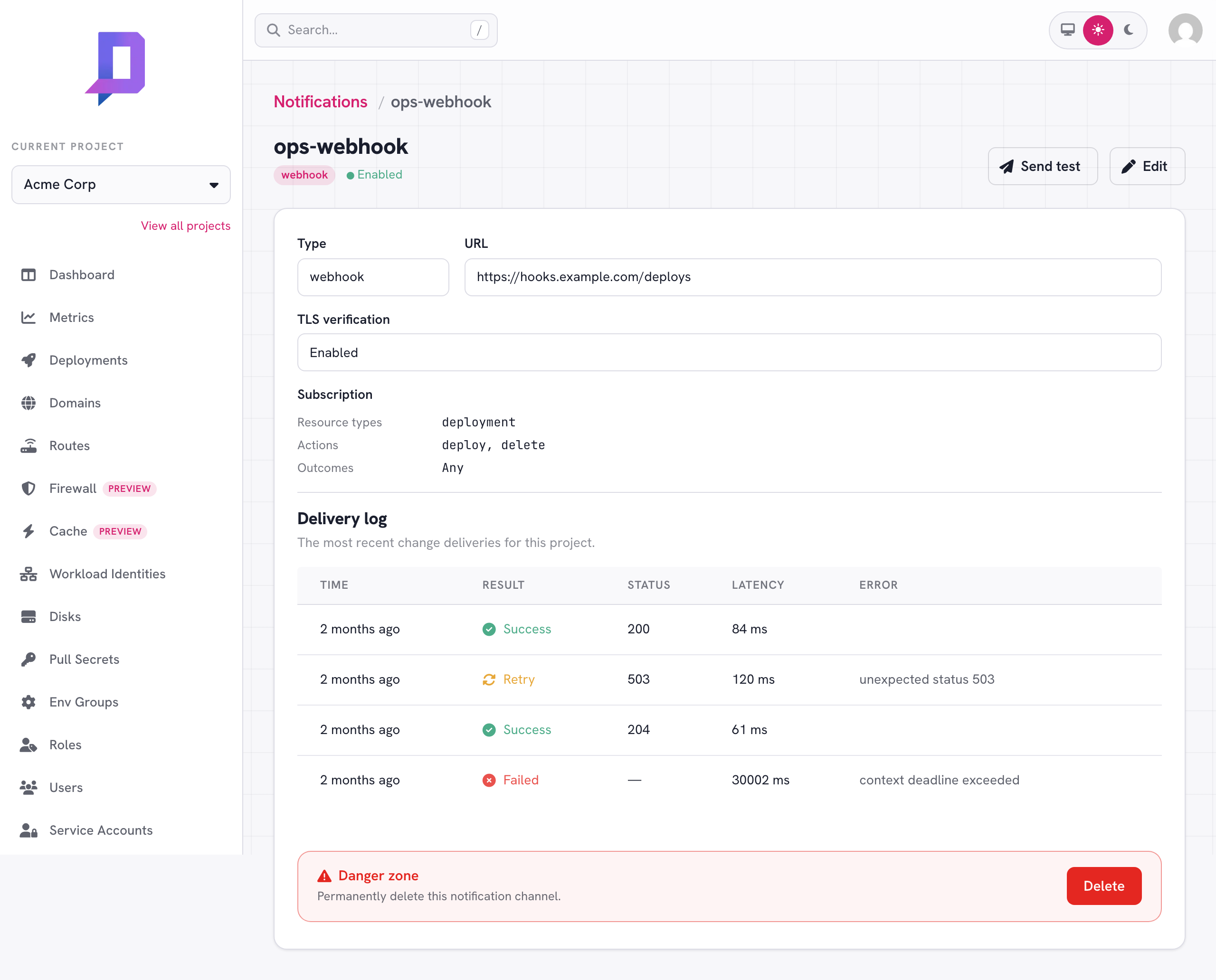
- Delivery log — every delivery records its time, result, HTTP status, and latency.
Create a channel#
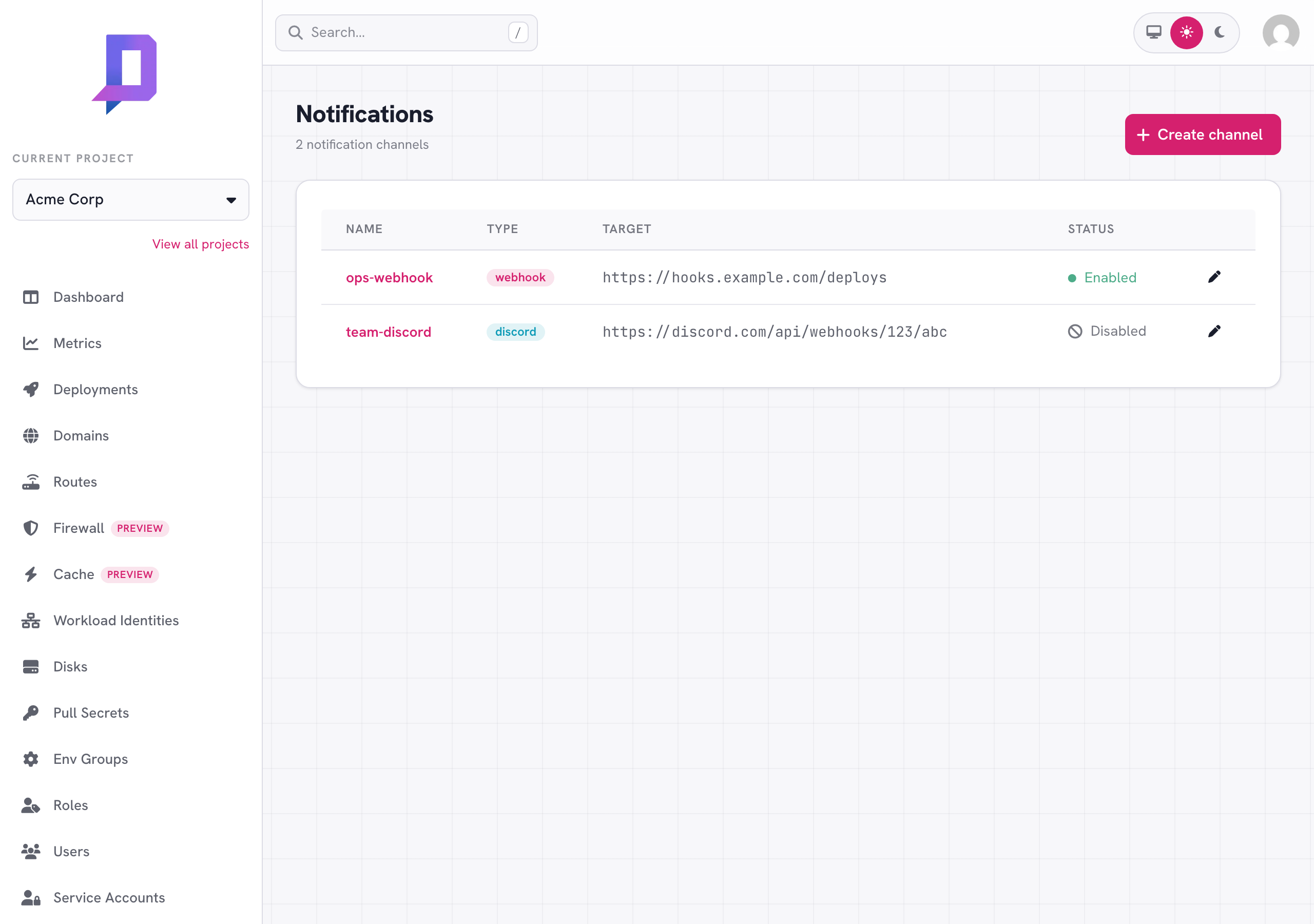
From the console, open Notifications and click Create channel. Or use the CLI:
deploys notification create \
  --project acme \
  --name ops-webhook \
  --type webhook \
  --url https://hooks.example.com/deploys \
  --secret "$SIGNING_SECRET" \
  --event deployment.deploy \
  --event deployment.delete
Fields#
| Field | Description |
|---|---|
| Name | A project-unique name (lowercase, e.g. ops-webhook). |
| Type | webhook (signed JSON POST), discord (a Discord incoming-webhook URL), or pull (an agent-read queue — see Pull). |
| URL | The https endpoint to deliver to (webhook/discord; omit for pull). |
| Secret | The webhook signing secret (webhook only). Write-only — see Webhook. |
| Subscription | Which changes the channel receives — see Subscription filters. |
| Disabled | A disabled channel keeps its config but receives no deliveries. |
Channel types#
Webhook#
A webhook channel delivers the change as a JSON POST, signed so your endpoint
can confirm it really came from Deploys.app. The body is the change payload:
{
  "project": "acme",
  "location": "gke.cluster-rcf2",
  "actor": "alice@example.com",
  "actorType": "User",
  "action": "deploy",
  "resourceType": "deployment",
  "resourceId": "42",
  "resourceName": "web",
  "outcome": "success",
  "message": "revision 5",
  "time": "2026-06-20T09:00:00Z"
}
Each request carries an X-Deploys-Signature header — sha256= followed by the
hex HMAC-SHA256 of the exact request body bytes, keyed with your secret.
Verify it before trusting the payload:
import crypto from 'node:crypto'

// rawBody is the exact bytes received (do NOT re-serialize the parsed JSON).
function verify (rawBody, header, secret) {
  const expected = 'sha256=' + crypto.createHmac('sha256', secret).update(rawBody).digest('hex')
  const a = Buffer.from(header || '')
  const b = Buffer.from(expected)
  return a.length === b.length && crypto.timingSafeEqual(a, b)
}
The same scheme works in any language: HMAC-SHA256 the raw body with your
secret, hex-encode it, prefix sha256=, and compare in constant time.
notification get or shown in the console. On edit, leave
the secret blank to keep the stored one; set it to replace it.Discord#
A discord channel posts a one-line message to a Discord incoming-webhook URL. The URL embeds Discord’s own token, so no separate signing secret is needed — treat the URL itself as a credential.
deploys notification create --project acme --name team-discord \
  --type discord \
  --url https://discord.com/api/webhooks/123/abc \
  --outcome failure
Pull (agent subscription)#
A pull channel has no delivery target. Instead of Deploys.app pushing to a URL, you fetch the project’s changes on your own schedule — ideal for a local script or AI agent that has no public URL to receive a webhook. The change events are the same audit-safe payloads a webhook receives.
Create a pull channel (no URL, no secret), then read from it:
deploys notification create --project acme --name local-agent \
  --type pull \
  --event 'deployment.*'

# fetch the next batch once
deploys notification pull --project acme --name local-agent

# stream new changes live as they happen (one event per line)
deploys notification pull --project acme --name local-agent --follow
Cursor and acknowledgement. Deploys.app stores a per-channel cursor. Each
pull returns a batch of events plus a cursor; pass that value back as -ack
once you have durably handled the batch and the server advances past it. Delivery
is at-least-once — until you ack, the same events are redelivered, so a crash
mid-batch never loses a change. A new channel starts at the current head, so it
only sees changes made after it was created (history older than the 30-day outbox
retention is not replayed).
Live streaming (SSE). --follow opens a Server-Sent Events stream and
the server pushes each change as it lands — no polling interval, near-real-time —
printing one event per line. Choose the line format with --output: json emits
compact NDJSON (one JSON object per line, easy for an agent to parse
incrementally), yaml a YAML document per event, and the default a tab-separated
time · actor · action · resource · outcome line. The stream reconnects on its
own and resumes from where it left off (it acknowledges as it goes, so an
interrupt before an event is handled redelivers it). Add --poll to fall back to
plain RPC polling for an environment that blocks streaming.
A non-CLI consumer can read the same stream directly. It’s a normal API action,
notification.pullStream — the same POST + JSON request as notification.pull,
but the response is an event stream instead of a single batch:
POST https://api.deploys.app/notification.pullStream
Content-Type: application/json

{ "project": "<id>", "name": "<channel>", "ack": <last-handled-id> }
Authenticate exactly as for any API call (a Bearer token — a scoped
me.generateToken limited to notification.pull works well). Each change
event’s SSE id is the acknowledgement token: pass it back as ack on the next
connect to advance the cursor. A pre-stream failure (forbidden, unknown channel)
comes back as the usual { "ok": false, "error": … } JSON rather than a stream.
Auto-delete. A pull channel deletes itself after an inactivity window so
abandoned subscriptions don’t pile up. The window defaults to 15 minutes;
override it per channel with --pull-ttl <seconds> (60–86400). Every pull resets
the timer, so an actively-polling agent stays alive. The tidy path is to delete
the channel when your agent exits; the auto-delete is the safety net for a crash.
deploys notification delete --project acme --name local-agent
Pull channels don’t appear in the push delivery log and don’t support
Send test (there’s no endpoint to deliver to). Permission to consume one is
notification.pull.
Subscription filters#
A subscription has two axes — events and outcomes. A change is delivered to a channel when it matches on both; an empty axis matches anything, so an empty subscription receives every change.
An event identifies what changed as <resource>.<action> — the same writes
the audit log records, e.g. deployment.deploy,
domain.create, role.grant. The events list uses the same grammar as
role permissions, plus a leading *. form:
| Pattern | Matches |
|---|---|
* | every change |
deployment.* | any action on deployments |
*.delete | a delete of any resource |
deployment.deploy | exactly that resource + action |
The outcomes axis is success / failure; empty means either.
# only failed deployment deploys
deploys notification update --project acme --name ops-webhook \
  --event deployment.deploy --outcome failure

# any deployment change, plus any domain delete
deploys notification update --project acme --name ops-webhook \
  --event 'deployment.*' --event '*.delete'
deployment.* and domain.create
without also matching domain.delete (which separate resource/action axes could
not express).Asynchronous failures: deployment.health#
A deployment can fail after its deployment.deploy call already returned —
the image pulls but the container crash-loops, gets OOM-killed, or the cluster
apply fails once the rollout starts. Those transitions happen on the platform’s
own time, not in your request, so they surface as a separate event:
| Event | Fires when |
|---|---|
deployment.deploy + failure | the deploy was rejected synchronously — bad request, quota, validation — at the moment you called it. |
deployment.health + failure | the deploy was accepted, then the workload failed afterwards — a crash-loop/OOM/ImagePull the platform auto-errors, or a deployer apply failure. |
Subscribe to both for complete coverage of “my deploy is broken”:
deploys notification update --project acme --name ops-webhook \
  --event deployment.health --event deployment.deploy --outcome failure
deployment.health events are written by the system, not a user, so they
carry an empty actor (actorType user, no email) — that’s how you tell a
self-detected failure from someone’s deployment.deploy. The message carries a
short, non-secret reason — CrashLoopBackOff, OOMKilled, no running pods,
or deployer apply failed. The event never carries log content; read the crash
output on demand with deployment.logs (set
previous:true for a crash-loop). Because the audit write is unconditional, a
project with no channel still gets an auditable deployment health row per
auto-detected failure.
See Monitoring → react to failures without polling for the end-to-end agent loop this enables.
Test and the delivery log#
Use Send test (console) or notification test to deliver a synthetic change
to a channel right now and see the classified result — handy after editing the
URL or secret.
deploys notification test       --project acme --name ops-webhook
deploys notification deliveries --project acme --name ops-webhook --limit 50
TLS verification#
For HTTPS webhook targets with self-signed or otherwise untrusted certificates,
enable Skip TLS verification (--insecure-tls). Deliveries are still blocked
from reaching private, loopback, link-local, and cloud-metadata addresses.
Delivery contract#
- At-least-once. A failed delivery is retried with exponential backoff (up to
five attempts). A retry re-sends the byte-identical payload — same fields,
same
time, same signature — so dedupe on the payload (hash the body, or useresourceType+resourceId+action+timeas a key). - Unordered. Deliveries fan out concurrently, so events for the same resource
can arrive out of order. Key on
time, not arrival order. - Redacted by construction. A delivery carries only the audit-safe change fields above — never secrets, environment variables, or request bodies.
Permissions#
| Action | Permission |
|---|---|
| Create | notification.create |
| Edit | notification.update |
| View / list / deliveries | notification.get / notification.list |
| Delete | notification.delete |
| Send test | notification.test |
| Pull (consume a pull channel) | notification.pull |
Grant these on a role like any other permission. Channel URLs
can point at internal endpoints and a pull channel streams the project’s changes,
so notification.get / notification.list / notification.pull are not
grantable to public principals (allUsers / allAuthenticatedUsers).